- Vark2026-09-23
anthropic.com
Introducing Claude Opus 5.5
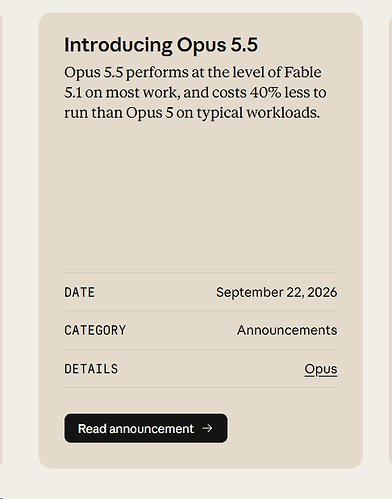
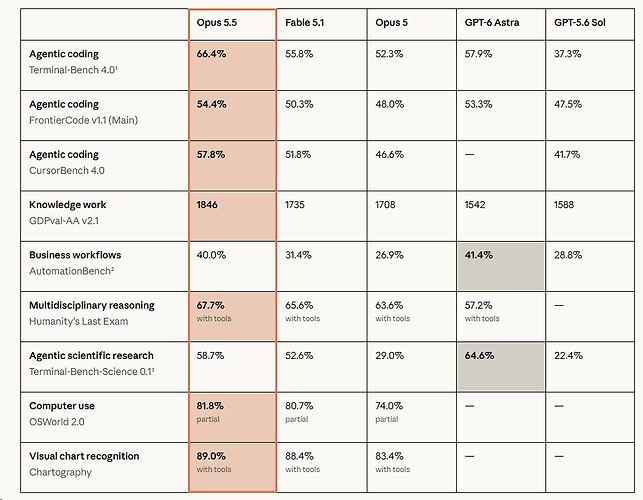
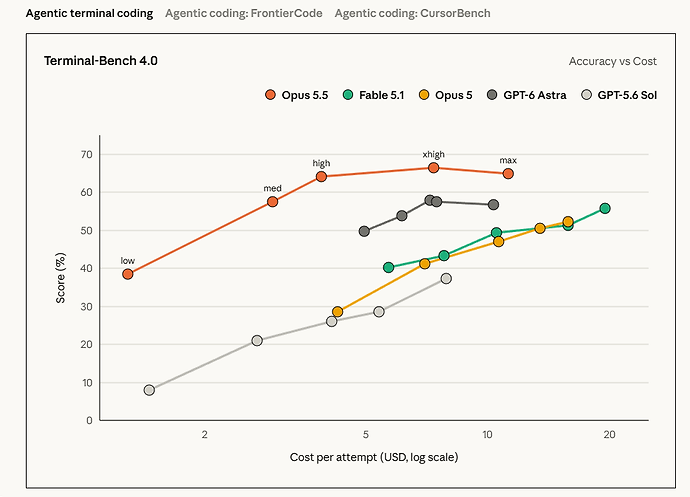
Claude Opus 5.5 leads in agentic coding and knowledge work, and costs 40% less to run than Opus 5 on typical workloads.
A/已滑跪,还得是市场竞争啊

顺手跑了个鹈鹕,max思考等级```
<!DOCTYPE html>
<html lang="zh-CN">
<head>
<meta charset="UTF-8">
<meta name="viewport" content="width=device-width, initial-scale=1.0">
<title>鹈鹕骑自行车 · SVG 动画</title>
<style>
* { box-sizing: border-box; margin: 0; padding: 0; }
body {
min-height: 100vh;
display: flex;
flex-direction: column;
align-items: center;
justify-content: center;
gap: 18px;
padding: 20px;
background: linear-gradient(135deg, #ffecd2, #fcb69f);
font-family: "Segoe UI", "Microsoft YaHei", sans-serif;
color: #4a3b35;
}
h1 { font-size: 28px; letter-spacing: 2px; text-shadow: 0 2px 0 #fff8; }
.stage {
width: min(960px, 100%);
border-radius: 24px;
overflow: hidden;
border: 6px solid #fff;
background: #bfe8ff;
box-shadow: 0 20px 50px rgba(120, 60, 30, .3);
cursor: pointer;
}
svg { display: block; width: 100%; height: auto; }
.controls {
display: flex; gap: 14px; align-items: center; flex-wrap: wrap; justify-content: center;
background: #fff9; padding: 12px 22px; border-radius: 999px; backdrop-filter: blur(6px);
}
button {
border: none; border-radius: 999px; padding: 9px 18px; font-size: 15px; font-weight: 600;
cursor: pointer; color: #fff; background: #ff7f50; box-shadow: 0 4px 0 #d95f33;
transition: transform .1s, box-shadow .1s;
}
button:active { transform: translateY(3px); box-shadow: 0 1px 0 #d95f33; }
label { display: flex; align-items: center; gap: 8px; font-weight: 600; }
input[type=range] { width: 160px; accent-color: #ff7f50; }
#speedVal { display: inline-block; min-width: 44px; }
.hint { font-size: 13px; opacity: .7; }/ 眨眼动画 /
.eye-lid { transform-box: fill-box; transform-origin: center; animation: blink 4s infinite; }
@keyframes blink { 0%, 92%, 100% { transform: scaleY(1); } 95% { transform: scaleY(.1); } }/ 速度线 /
.speed-line { stroke-dasharray: 40 200; animation: dash .6s linear infinite; }
@keyframes dash { from { stroke-dashoffset: 0; } to { stroke-dashoffset: 240; } }
.paused .speed-line { animation-play-state: paused; }/ 太阳光晕 /
.sun-glow { transform-box: fill-box; transform-origin: center; animation: pulse 3s ease-in-out infinite; }
@keyframes pulse { 50% { transform: scale(1.12); opacity: .45; } }/ 铃铛气泡 /
#bubble { opacity: 0; transition: opacity .2s; }
#bubble.show { opacity: 1; }
</style>
</head>
<body><h1>🐦 鹈鹕骑自行车 🚲</h1>
<div class="stage" id="stage" title="点击画面按铃铛">
<svg id="scene" viewBox="0 0 800 500" xmlns="http://www.w3.org/2000/svg">
<defs>
<linearGradient id="sky" x1="0" y1="0" x2="0" y2="1">
<stop offset="0" stop-color="#7ec8f5"/>
<stop offset="1" stop-color="#e8f7ff"/>
</linearGradient>
<!-- 云朵形状 -->
<g id="cloudShape" fill="#fff" opacity=".92">
<ellipse cx="0" cy="0" rx="40" ry="18"/>
<ellipse cx="-26" cy="6" rx="26" ry="14"/>
<ellipse cx="28" cy="6" rx="28" ry="14"/>
<ellipse cx="4" cy="-12" rx="24" ry="16"/>
</g>
</defs><!-- 天空与太阳 -->
<rect width="800" height="500" fill="url(#sky)"/>
<circle class="sun-glow" cx="680" cy="90" r="60" fill="#fff3b0" opacity=".7"/>
<circle cx="680" cy="90" r="40" fill="#ffd54f"/><!-- 云朵(JS 控制位置) -->
<g id="clouds">
<use href="#cloudShape" id="cloud0"/>
<use href="#cloudShape" id="cloud1"/>
<use href="#cloudShape" id="cloud2"/>
</g><!-- 远山(视差层) -->
<g id="farHills" fill="#a8d8a0">
<path d="M0 330 Q100 260 200 310 T400 300 T600 310 T800 330 V400 H0 Z"/>
<path d="M0 330 Q100 260 200 310 T400 300 T600 310 T800 330 V400 H0 Z" transform="translate(800,0)"/>
</g><!-- 近山 + 树(视差层) -->
<g id="nearHills">
<g id="nearTile">
<path d="M0 360 Q150 300 300 350 T600 345 T800 360 V400 H0 Z" fill="#7cc47a"/>
<g>
<rect x="147" y="318" width="6" height="18" fill="#8a5a3b"/>
<circle cx="150" cy="308" r="16" fill="#4fa35a"/>
<rect x="467" y="354" width="6" height="18" fill="#8a5a3b"/>
<circle cx="470" cy="344" r="14" fill="#4fa35a"/>
<rect x="697" y="307" width="6" height="18" fill="#8a5a3b"/>
<circle cx="700" cy="296" r="18" fill="#4fa35a"/>
</g>
</g>
<use href="#nearTile" x="800"/>
</g><!-- 地面与道路 -->
<rect x="0" y="390" width="800" height="110" fill="#6dbb5a"/>
<rect x="0" y="397" width="800" height="50" fill="#a9a59d"/>
<line x1="0" y1="397" x2="800" y2="397" stroke="#85817a" stroke-width="3"/>
<line x1="0" y1="447" x2="800" y2="447" stroke="#85817a" stroke-width="3"/>
<line id="roadDash" x1="0" y1="422" x2="800" y2="422" stroke="#fff" stroke-width="4" stroke-dasharray="30 25"/><!-- 影子 -->
<ellipse cx="370" cy="402" rx="150" ry="7" fill="#0003"/><!-- 速度线 -->
<g id="speedLines" stroke="#fff" stroke-width="3" stroke-linecap="round" opacity=".85">
<path class="speed-line" d="M110 175 L230 175"/>
<path class="speed-line" d="M80 215 L210 215" style="animation-delay:-.2s"/>
<path class="speed-line" d="M120 265 L200 265" style="animation-delay:-.35s"/>
<path class="speed-line" d="M70 320 L180 320" style="animation-delay:-.5s"/>
</g><!-- ===== 自行车 + 鹈鹕 ===== -->
<g id="rider">
<!-- 远侧曲柄与脚踏 -->
<line id="farCrank" stroke="#666" stroke-width="6" stroke-linecap="round"/>
<rect id="farPedal" width="22" height="6" rx="2" fill="#444"/>
<!-- 远侧腿(JS 生成) -->
<g id="farLegG"></g><!-- 车轮 -->
<g transform="translate(260,330)"><g id="rearSpin"></g></g>
<g transform="translate(480,330)"><g id="frontSpin"></g></g><!-- 车架 -->
<g stroke="#1f9e97" stroke-width="7" stroke-linecap="round" stroke-linejoin="round" fill="none">
<path d="M260 330 L350 340 L328 252 Z"/>
<path d="M328 252 L438 248 L446 268 L350 340"/>
<path d="M446 268 L480 330" stroke="#178a84" stroke-width="6"/>
<path d="M438 248 L446 268" stroke="#146f6a" stroke-width="10"/>
</g>
<!-- 车灯 -->
<circle cx="452" cy="262" r="5" fill="#ffe066" stroke="#2d2a32" stroke-width="1.5"/>
<!-- 座杆、车座、把立、车把 -->
<path d="M328 252 L323 238" stroke="#999" stroke-width="5" stroke-linecap="round"/>
<path d="M300 236 Q318 228 342 236 Q330 244 305 242 Z" fill="#3b3b3b"/>
<path d="M438 248 L435 226" stroke="#888" stroke-width="5" stroke-linecap="round"/>
<path d="M428 228 Q448 218 466 220" stroke="#666" stroke-width="5" fill="none" stroke-linecap="round"/>
<path d="M458 219 L470 221" stroke="#333" stroke-width="7" stroke-linecap="round"/><!-- 牙盘、飞轮、链条 -->
<circle cx="260" cy="330" r="9" fill="#bbb" stroke="#666" stroke-width="2"/>
<g id="chainring">
<circle cx="350" cy="340" r="20" fill="#cfd4d8" stroke="#666" stroke-width="3" stroke-dasharray="4 2.3"/>
<path d="M350 324 L350 356 M334 340 L366 340" stroke="#888" stroke-width="3"/>
<circle cx="350" cy="340" r="6" fill="#888"/>
</g>
<path id="chain" d="M350 319 L260 320 A10 10 0 0 0 260 340 L350 361 A21 21 0 0 0 350 319"
fill="none" stroke="#555" stroke-width="2.5" stroke-dasharray="4 2"/><!-- 鹈鹕上半身 -->
<g id="pelicanUpper" stroke="#2d2a32" stroke-width="2.5" stroke-linejoin="round" stroke-linecap="round">
<!-- 远侧翅膀(握住车把) -->
<path d="M372 184 Q415 196 452 208" fill="none" stroke="#2d2a32" stroke-width="17"/>
<path d="M372 184 Q415 196 452 208" fill="none" stroke="#b9c3cc" stroke-width="12"/>
<ellipse cx="455" cy="209" rx="7" ry="5" fill="#3a3f47"/>
<!-- 尾巴 -->
<path d="M262 186 L226 172 L236 190 L220 200 L240 204 L228 216 L266 208 Z" fill="#f4f4f4"/>
<!-- 脖子(S 形) -->
<path d="M372 178 C410 172 422 150 410 130 C400 112 414 98 432 100" fill="none" stroke="#2d2a32" stroke-width="27"/>
<path d="M372 178 C410 172 422 150 410 130 C400 112 414 98 432 100" fill="none" stroke="#fff" stroke-width="21"/>
<!-- 身体 -->
<path d="M252 198 Q258 152 318 148 Q382 146 398 186 Q402 236 334 246 Q272 250 252 198 Z" fill="#fff"/>
<!-- 盖住脖子根部的描边,让脖子自然接入身体 -->
<path d="M372 178 C385 176 392 172 398 168" fill="none" stroke="#fff" stroke-width="18"/>
<!-- 肚子阴影 -->
<path d="M270 215 Q300 242 340 240 Q380 234 392 205 Q380 228 335 232 Q296 234 270 215 Z" fill="#e9eef2" stroke="none"/>
<!-- 近侧翅膀 -->
<path d="M292 172 Q345 156 382 180 Q386 212 336 222 Q294 226 266 206 Q272 184 292 172 Z" fill="#dfe6ec"/>
<path d="M300 190 Q325 186 350 196 M296 204 Q322 202 348 210" fill="none" stroke="#b5c0ca" stroke-width="2"/>
<!-- 黑色飞羽 -->
<path d="M268 206 Q250 214 232 212 Q246 204 256 198 Q240 200 228 196 Q252 188 280 192 Z" fill="#3a3f47"/>
<!-- 近侧翅膀伸向车把 -->
<path d="M370 192 Q418 204 456 214" fill="none" stroke="#2d2a32" stroke-width="18"/>
<path d="M370 192 Q418 204 456 214" fill="none" stroke="#dfe6ec" stroke-width="13"/>
<path d="M452 207 Q466 208 468 216 Q464 224 452 221 Z" fill="#3a3f47"/><!-- 头部 -->
<g id="head">
<!-- 冠羽 -->
<path d="M420 88 Q404 74 398 84 Q410 86 414 94 Z" fill="#ffe9a8"/>
<path d="M424 84 Q414 66 406 72 Q418 78 420 90 Z" fill="#ffe9a8"/>
<ellipse cx="440" cy="100" rx="25" ry="21" fill="#fff"/>
<!-- 喉囊(里面藏着一条小鱼) -->
<g id="pouch">
<path d="M458 108 Q520 114 584 126 Q562 152 512 152 Q472 148 456 118 Z" fill="#f59e3b"/>
<path d="M505 134 Q520 124 536 134 Q520 144 505 134 Z M536 134 L546 127 L546 141 Z" fill="#5b8def" opacity=".35" stroke="none"/>
</g>
<!-- 上喙 -->
<path d="M456 92 Q522 94 590 116 Q598 121 590 127 Q522 110 458 107 Z" fill="#fcc443"/>
<path d="M466 100 Q520 104 578 118" fill="none" stroke="#e39a1f" stroke-width="1.5"/>
<!-- 腮红 -->
<ellipse cx="437" cy="111" rx="6" ry="3.5" fill="#ff9aa2" opacity=".6" stroke="none"/>
<!-- 眼睛 -->
<g class="eye-lid">
<circle cx="446" cy="93" r="5.5" fill="#2d2a32" stroke="none"/>
<circle cx="448" cy="91" r="1.8" fill="#fff" stroke="none"/>
</g>
</g>
</g><!-- 近侧曲柄、脚踏、腿 -->
<line id="nearCrank" stroke="#555" stroke-width="6" stroke-linecap="round"/>
<rect id="nearPedal" width="22" height="6" rx="2" fill="#333"/>
<g id="nearLegG"></g>
</g><!-- 前景草丛(视差层,JS 生成) -->
<g id="grass">
<g id="grassTile"></g>
<use href="#grassTile" x="800"/>
</g><!-- 铃铛气泡 -->
<g id="bubble">
<path d="M470 30 h110 a14 14 0 0 1 14 14 v16 a14 14 0 0 1 -14 14 h-80 l-18 14 l4 -14 h-16 a14 14 0 0 1 -14 -14 v-16 a14 14 0 0 1 14 -14 z"
fill="#fff" stroke="#2d2a32" stroke-width="2"/>
<text x="525" y="58" text-anchor="middle" font-size="18" font-weight="700" fill="#ff7f50">叮铃铃~♪</text>
</g>
</svg>
</div><div class="controls">
<button id="pauseBtn">⏸ 暂停</button>
<label>速度
<input type="range" id="speed" min="0.2" max="3" step="0.1" value="1">
<span id="speedVal">1.0x</span>
</label>
<button id="bellBtn">🔔 按铃</button>
</div>
<div class="hint">快捷键:空格 暂停/继续 · B 按铃 · 点击画面也能按铃</div><script>
(() => {
const NS = 'http://www.w3.org/2000/svg';
const OUT = '#2d2a32';
const $ = id => document.getElementById(id);// ---------- 几何常量 ----------
const BB = { x: 350, y: 340 }; // 中轴(牙盘中心)
const CRANK = 28; // 曲柄长度
const L1 = 72, L2 = 72; // 大腿 / 小腿长度
const HIP = { x: 330, y: 226 }; // 髋关节基准位置
const WHEEL_R = 70; // 车轮半径
const GEAR = 1.8; // 传动比(车轮转速 / 曲柄转速)// ---------- 工具:批量创建 SVG 元素 ----------
function mk(parent, tag, attrs) {
const el = document.createElementNS(NS, tag);
for (const k in attrs) el.setAttribute(k, attrs[k]);
parent.appendChild(el);
return el;
}// ---------- 生成车轮(外胎、轮圈、辐条、花鼓) ----------
function buildWheel(g) {
mk(g, 'circle', { r: WHEEL_R, fill: 'none', stroke: '#2b2b2b', 'stroke-width': 9 });
mk(g, 'circle', { r: WHEEL_R - 6, fill: 'none', stroke: '#c9ced3', 'stroke-width': 3 });
for (let i = 0; i < 16; i++) {
const a = i / 16 Math.PI 2;
mk(g, 'line', {
x1: 0, y1: 0,
x2: (Math.cos(a) * (WHEEL_R - 7)).toFixed(2),
y2: (Math.sin(a) * (WHEEL_R - 7)).toFixed(2),
stroke: '#d8dde2', 'stroke-width': 1.5
});
}
// 辐条上的反光片,方便看出转动
mk(g, 'rect', { x: 30, y: -3, width: 12, height: 6, rx: 2, fill: '#ff6b6b' });
mk(g, 'circle', { r: 7, fill: '#999', stroke: '#666', 'stroke-width': 2 });
}
buildWheel($('rearSpin'));
buildWheel($('frontSpin'));// ---------- 生成腿 ----------
function createLeg(parent, c) {
const line = (w, color) => mk(parent, 'path', {
fill: 'none', stroke: color, 'stroke-width': w, 'stroke-linecap': 'round'
});
// 先画描边再画填充,关节处更自然
const thighO = line(12, OUT), shinO = line(10, OUT);
const thigh = line(8, c.leg), shin = line(6, c.leg);
const knee = mk(parent, 'circle', { r: 5, fill: c.leg, stroke: OUT, 'stroke-width': 2 });
const foot = mk(parent, 'path', {
d: 'M-6 -2 Q4 -7 20 -2 L25 3 Q8 6 -6 4 Z',
fill: c.leg, stroke: OUT, 'stroke-width': 2, 'stroke-linejoin': 'round'
});
const puff = mk(parent, 'ellipse', { rx: 13, ry: 10, fill: c.puff, stroke: OUT, 'stroke-width': 2 });
return { thighO, shinO, thigh, shin, knee, foot, puff };
}
const farLeg = createLeg($('farLegG'), { leg: '#c9701f', puff: '#dcdcdc' });
const nearLeg = createLeg($('nearLegG'), { leg: '#f28c28', puff: '#ffffff' });// 两段式反向运动学:已知髋和脚踝,求膝盖(膝盖朝前)
function ik(h, f) {
const dx = f.x - h.x, dy = f.y - h.y;
const d = Math.min(Math.hypot(dx, dy), L1 + L2 - 0.5);
const base = Math.atan2(dy, dx);
const c = Math.max(-1, Math.min(1, (L1 L1 + d d - L2 L2) / (2 L1 * d)));
const a = base - Math.acos(c);
return { x: h.x + L1 Math.cos(a), y: h.y + L1 Math.sin(a) };
}function updateLeg(leg, hip, ankle) {
const k = ik(hip, ankle);
const t =M${hip.x} ${hip.y} L${k.x} ${k.y};
const s =M${k.x} ${k.y} L${ankle.x} ${ankle.y};
leg.thighO.setAttribute('d', t); leg.thigh.setAttribute('d', t);
leg.shinO.setAttribute('d', s); leg.shin.setAttribute('d', s);
leg.knee.setAttribute('cx', k.x); leg.knee.setAttribute('cy', k.y);
leg.foot.setAttribute('transform',translate(${ankle.x - 6},${ankle.y - 3}));
leg.puff.setAttribute('cx', hip.x); leg.puff.setAttribute('cy', hip.y);
}function updateCrank(lineEl, pedalEl, angle) {
const px = BB.x + CRANK * Math.cos(angle);
const py = BB.y + CRANK * Math.sin(angle);
lineEl.setAttribute('x1', BB.x); lineEl.setAttribute('y1', BB.y);
lineEl.setAttribute('x2', px); lineEl.setAttribute('y2', py);
pedalEl.setAttribute('x', px - 11); pedalEl.setAttribute('y', py - 3);
return { x: px, y: py - 6 }; // 返回脚踝位置(踩在脚踏上方)
}// ---------- 生成前景草丛 ----------
(function buildGrass() {
const tile = $('grassTile');
const colors = ['#ff8fab', '#ffd166', '#ffffff', '#b8a1ff'];
for (let i = 0; i < 26; i++) {
const x = i 31 + (i 17 % 13);
const y = 462 + (i * 37 % 30);
mk(tile, 'path', {
d:M${x} ${y} l-5 -12 M${x} ${y} l0 -15 M${x} ${y} l6 -11,
stroke: '#3f8f3a', 'stroke-width': 2.5, 'stroke-linecap': 'round', fill: 'none'
});
if (i % 4 === 0) {
mk(tile, 'circle', { cx: x, cy: y - 16, r: 3.5, fill: colors[(i / 4) % colors.length] });
}
}
})();// ---------- 状态 ----------
const els = {
rearSpin: $('rearSpin'), frontSpin: $('frontSpin'), chainring: $('chainring'), chain: $('chain'),
upper: $('pelicanUpper'), head: $('head'), pouch: $('pouch'),
farCrank: $('farCrank'), farPedal: $('farPedal'), nearCrank: $('nearCrank'), nearPedal: $('nearPedal'),
farHills: $('farHills'), nearHills: $('nearHills'), grass: $('grass'), roadDash: $('roadDash'),
speedLines: $('speedLines'), scene: $('scene'),
clouds: [$('cloud0'), $('cloud1'), $('cloud2')]
};
const cloudCfg = [
{ x: 100, y: 70, s: 1.0 },
{ x: 480, y: 130, s: 0.7 },
{ x: 820, y: 60, s: 1.2 }
];let crank = 0, t = 0, speed = 1, paused = false, last = performance.now();
function frame(now) {
const dt = Math.min(0.05, (now - last) / 1000);
last = now;
if (!paused) {
t += dt * speed;
crank += dt speed 4.2;
}const wheel = crank * GEAR;
const off = wheel * WHEEL_R; // 地面滚动距离,与车轮转动严格对应
const wheelDeg = wheel * 180 / Math.PI;
const crankDeg = crank * 180 / Math.PI;// 车轮、牙盘、链条
els.rearSpin.setAttribute('transform',rotate(${wheelDeg}));
els.frontSpin.setAttribute('transform',rotate(${wheelDeg}));
els.chainring.setAttribute('transform',rotate(${crankDeg} ${BB.x} ${BB.y}));
els.chain.setAttribute('stroke-dashoffset', (crank * 21).toFixed(2));// 身体随踩踏上下起伏,头部轻轻点头,喉囊晃动
const bob = Math.sin(crank 2) 2.2;
els.upper.setAttribute('transform',translate(0,${bob.toFixed(2)}));
els.head.setAttribute('transform',rotate(${(Math.sin(crank * 2 + 0.8) * 3).toFixed(2)} 430 110));
const sy = 1 + Math.sin(crank 2 + 1.6) 0.07;
els.pouch.setAttribute('transform',translate(460 110) scale(1 ${sy.toFixed(3)}) translate(-460 -110));// 曲柄与双腿(两侧相差 180°)
const hip = { x: HIP.x, y: HIP.y + bob };
const nearAnkle = updateCrank(els.nearCrank, els.nearPedal, crank);
const farAnkle = updateCrank(els.farCrank, els.farPedal, crank + Math.PI);
updateLeg(nearLeg, hip, nearAnkle);
updateLeg(farLeg, { x: hip.x - 4, y: hip.y - 2 }, farAnkle);// 视差滚动
els.farHills.setAttribute('transform',translate(${-(off * 0.12) % 800},0));
els.nearHills.setAttribute('transform',translate(${-(off * 0.3) % 800},0));
els.grass.setAttribute('transform',translate(${-(off * 1.25) % 800},0));
els.roadDash.setAttribute('stroke-dashoffset', (off % 55).toFixed(2));// 云朵缓慢飘动并循环
const shift = off 0.04 + t 12;
els.clouds.forEach((c, i) => {
const cfg = cloudCfg[i];
const x = ((cfg.x - shift) % 1100 + 1100) % 1100 - 150;
c.setAttribute('transform',translate(${x.toFixed(2)},${cfg.y}) scale(${cfg.s}));
});requestAnimationFrame(frame);
}
requestAnimationFrame(frame);// ---------- 交互 ----------
const pauseBtn = $('pauseBtn'), speedInput = $('speed'), speedVal = $('speedVal');function applySpeedLines() {
document.querySelectorAll('.speed-line').forEach(l => {
l.style.animationDuration = (0.6 / speed).toFixed(2) + 's';
});
els.speedLines.setAttribute('opacity', Math.min(0.9, speed / 1.4).toFixed(2));
}function togglePause() {
paused = !paused;
pauseBtn.textContent = paused ? '▶ 继续' : '⏸ 暂停';
els.scene.classList.toggle('paused', paused);
}speedInput.addEventListener('input', () => {
speed = parseFloat(speedInput.value);
speedVal.textContent = speed.toFixed(1) + 'x';
applySpeedLines();
});
pauseBtn.addEventListener('click', togglePause);// 铃铛:显示气泡 + WebAudio 合成铃声
let audioCtx = null, bubbleTimer = null;
function ringBell() {
const bubble = $('bubble');
bubble.classList.add('show');
clearTimeout(bubbleTimer);
bubbleTimer = setTimeout(() => bubble.classList.remove('show'), 1200);try {
audioCtx = audioCtx || new (window.AudioContext || window.webkitAudioContext)();
[0, 0.18].forEach(delay => {
[2100, 2650].forEach(freq => {
const osc = audioCtx.createOscillator();
const gain = audioCtx.createGain();
const start = audioCtx.currentTime + delay;
osc.type = 'sine';
osc.frequency.value = freq;
gain.gain.setValueAtTime(0.0001, start);
gain.gain.exponentialRampToValueAtTime(0.18, start + 0.01);
gain.gain.exponentialRampToValueAtTime(0.0001, start + 0.45);
osc.connect(gain).connect(audioCtx.destination);
osc.start(start);
osc.stop(start + 0.5);
});
});
} catch (e) { / 浏览器不支持音频时静默忽略 / }
}
$('bellBtn').addEventListener('click', ringBell);
$('stage').addEventListener('click', ringBell);window.addEventListener('keydown', e => {
if (e.code === 'Space') { e.preventDefault(); togglePause(); }
if (e.key === 'b' || e.key === 'B') ringBell();
});applySpeedLines();
})();
</script>
</body>
</html>主楼 - randname2026-09-23
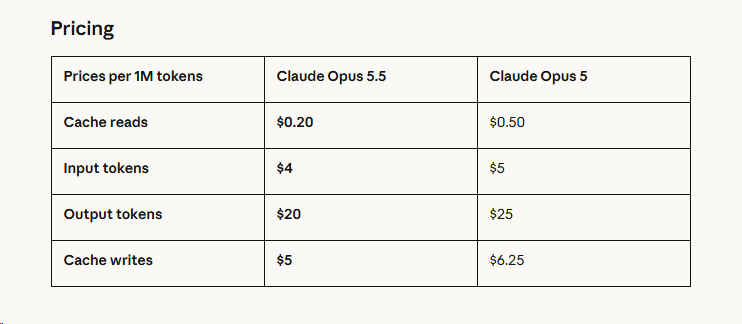
我还以为是降低到1/5呢 ^-^
- 林语尘2026-09-23
- nizheyuan2026-09-23
跑分把fable都干穿了呀
- fancyukyo2026-09-23
- 北辰Glasden2026-09-23
缓存读降低了60%, 编程场景感觉能便宜很多啊
- gitday2026-09-23
看标题差点以为a/要变为a圣了呢 ^-^
- 雪雪雪2026-09-23
我也以为是降到1/5,还想着A\什么时候这么大方了
- Dyna2026-09-23
One more thing: we’re increasing five-hour usage limits on Pro, Max, and Team plans. We’re also providing subscription users a rate limit reset, which you can save and use whenever you choose.
还有个好消息
- HLiny2026-09-23
订阅账号本来缓存读就不收费吧?
- 北辰Glasden2026-09-23
啊? 我没用过claude的订阅, A/这么良心吗, 缓存读不收费?
- ZRainbow2026-09-23
- jue2026-09-23
从我之前灰度的使用情况来看确实有点神
- WolfHolo2026-09-23
竞争是对的,任何一家取得大优势后都会开始搞事
- Monet2026-09-23
不收费的是缓存写吧,缓存读应该还是收费的
- 还想成为88VIP2026-09-23
提升5小时限额,利好5x啊,不知道提升多少,当初我开5x的时候怎么没有这种好事。
- ufhy2026-09-23
我记得确实不收, 去年有人测过
- QAQ-linuxdo2026-09-23
怎么可能写入不收费,就是读取才不收,写入是大头